Edit once.
Reuse forever.
Videdit.ai remembers your video template after one edit, then auto-edits your next video in the exact same style. Build repeatable content engines without rebuilding timelines.
Record the trims, timing, and edit logic you want the next video to reuse.
Built for repeatable scale.
Stop paying the "edit tax" every time you publish. Turn your proven formats into automated assembly lines.
Template Memory
The system remembers structure, transitions, captions, B-roll placement, music timing, and CTA blocks after you edit once.
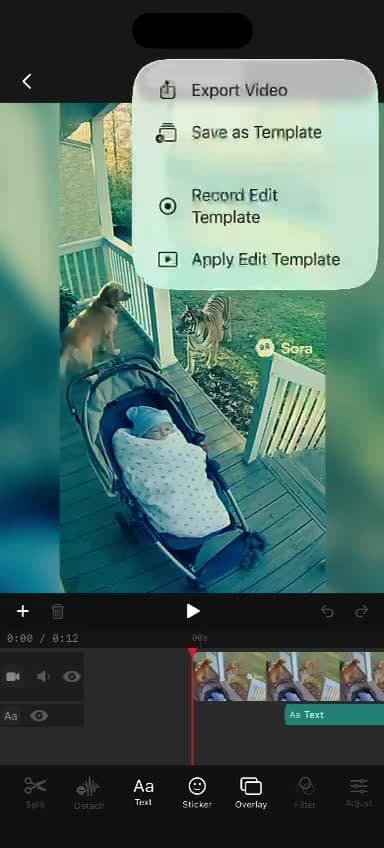
Save, record, or apply the template from the current project.
Smart Auto-Cut
Maps new clips to your saved structure, making the precise cuts to match your pacing.
Watch saved trims, text, and filters map onto new footage.
Cloud Project Sync
Keep active projects, shared edits, and backups ready to reopen without rebuilding the workspace.
Reopen synced projects, shared edits, and backups from one workspace.
Lightning Fast Batching
Turn one proven format into daily shorts, product demos, and ad variations. AI handles assembly, you keep the final approval.
Text + pacing
Style preset
Caption pass
How it works
Make one great edit
Trim clips, add captions, set your pacing, swap music, and publish your ideal version once.
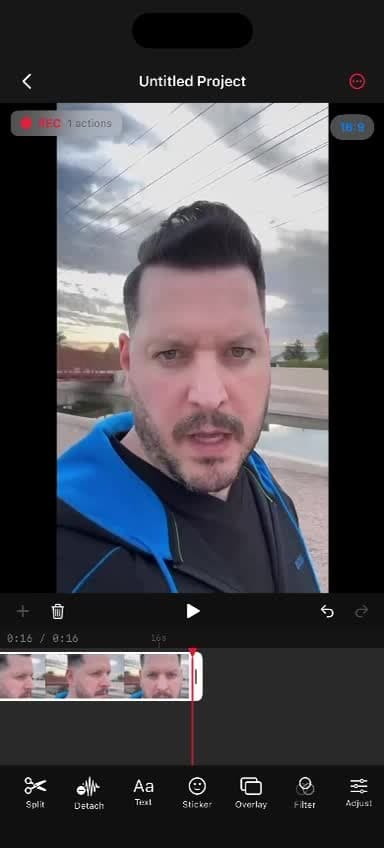
Set trims, captions, overlays, and beat timing one time.
Make one great edit
Trim clips, add captions, set your pacing, swap music, and publish your ideal version once.
Set trims, captions, overlays, and beat timing one time.
Capture the structure so the next edit follows the same rules.
Save as a smart template
Videdit learns your edit logic, shot order, beat timing, hook pattern, and visual rules.
Save as a smart template
Videdit learns your edit logic, shot order, beat timing, hook pattern, and visual rules.
Capture the structure so the next edit follows the same rules.
Drop in new footage
Open the saved template, load the next shoot, and let the system map your new raw clips into place.
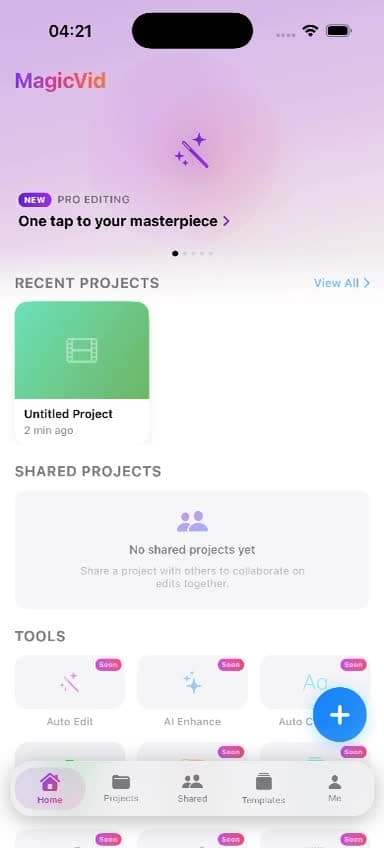
Projects, templates, and fresh uploads stay organized in one place.
Drop in new footage
Open the saved template, load the next shoot, and let the system map your new raw clips into place.
Projects, templates, and fresh uploads stay organized in one place.
Check caption size, placement, and timing before you publish.
Review the auto-edit
The system recreates the edit in your exact style, ready for a quick human-in-the-loop review before export.
Review the auto-edit
The system recreates the edit in your exact style, ready for a quick human-in-the-loop review before export.
Check caption size, placement, and timing before you publish.
See it in action
Real product moments that show how templates, captions, and final review work inside the app.
Apply the saved template
The app rebuilds trims, text, and filters from the edit you already approved instead of starting from zero.
The saved edit logic is replayed onto the new footage.
Open AI tools
Jump into auto caption, background removal, smart crop, cleanup, and enhancement tools from one panel.
Open the full AI toolbox without leaving the current edit.
Open caption controls
Jump straight into caption groups, auto captions, imports, and exports without leaving the edit flow.
Add, dictate, import, or export captions from one panel.
Review the final cut
Check the generated short, fine-tune caption size or placement, and approve only when it looks right.
Human-in-the-loop polish before export.
Frequently Asked Questions
Does Videdit replace my current editor?
What platforms does it work on?
Can I review the edit before publishing?
How does the AI know where to cut?
Stop starting from scratch.
Join the beta to start building your own AI video templates and scale your content production.
Ask an AI about Videdit
Have a question? Ask ChatGPT, Claude, or Gemini.
Get an independent take on what Videdit.ai is and whether it's right for you.